Security, Networks & Building Tech. One Partner for New York.
Cameras, Wi-Fi, cabling, access control, phones, POS and smart home — designed, installed and supported by the person who quotes your job.
- Licensed & insured
- Free demos
- No required cloud fees
 Piet AI
Every Wire Runs Out of One Brain.
Wi-Fi Business-grade access points, routers, switches and backup internet.
-
Cameras
InVid Tech Paramont cameras with 4K options, night vision and phone viewing. No required cloud fees.
Cameras
Works with InVid Tech Paramont, Home Assistant, RustDesk, Cat6 / Cat6A & fiber, VoIP, POS & payment terminals, access control and digital menu boards.
One Partner for Every Wire and Signal.
Fourteen services, one point of contact. Here are the six most requested.
Security Cameras
InVid Tech Paramont IP systems with 4K options, night vision and viewing from your phone.
See Details →Networking & Wi-Fi
Business-grade access points, routers and switches. Dead zones gone, guest networks done right.
See Details →Structured Cabling
Cat6/Cat6A and fiber — labeled, tested and documented, for new builds and retrofits.
See Details →Access Control & Intercoms
Keypads, fobs, mobile credentials and video intercoms for offices and multi-family doors.
See Details →Business Phones (VoIP)
Auto-attendants, call routing, mobile apps and voicemail-to-email.
Plan This →POS & Merchant
Restaurant and retail POS, payment terminals, kitchen printers and the network behind them.
See Payments →Nine Ways We Take Tech Off Your Plate.
Try every one of them right here. Each demo is free and takes about a minute — no form, no sign-up.
An App Built for Your Trade.
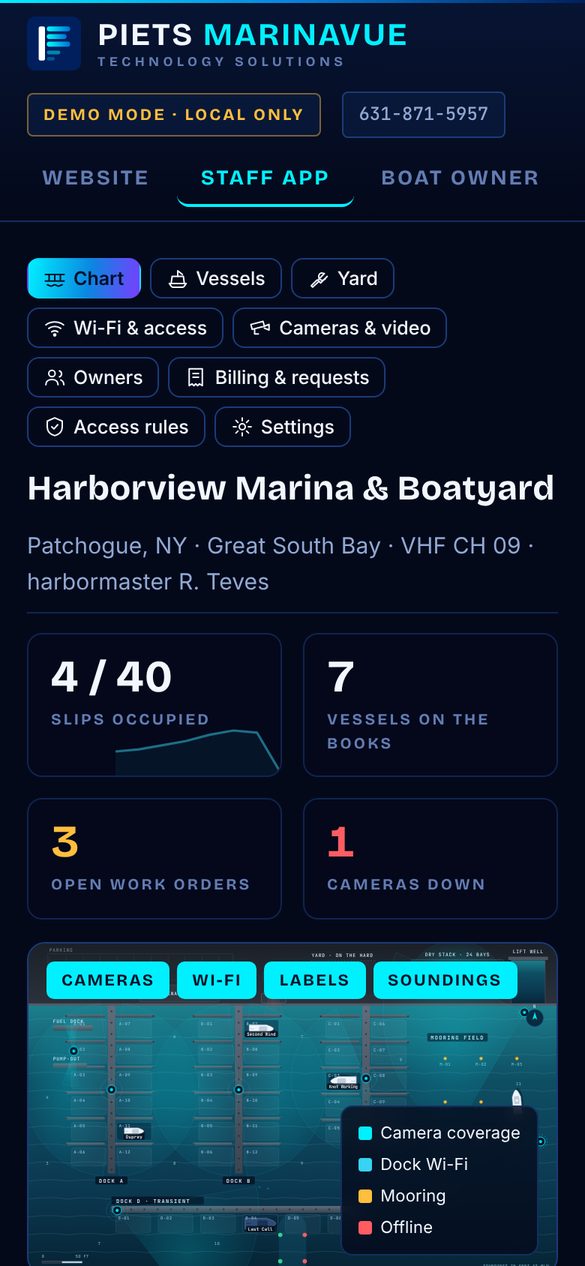
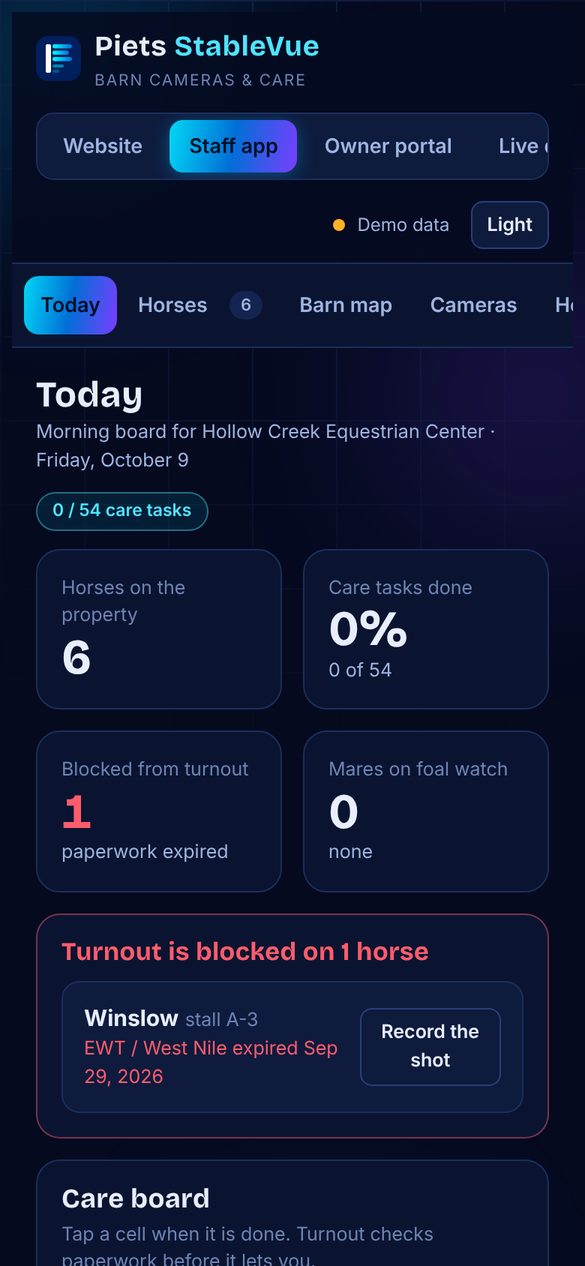
MarinaVue, StableVue, PuppyVue and more — staff app, customer portal and cameras in one place, with your name on it.
Open the Live App Demos →
See It on Your Own House.
Upload a photo and place the cameras yourself, or run the roofline in warm white and see what the street sees.
Open the Design Studio → Payments & POSRing It Up, Keep the Margin.
Merchant processing, a register built around your menu, and an honest read of what your statement is costing you.
Open the Live Register → Ghost KitchenYour Customer, Their Driver.
Your own ordering page, every platform on one menu, delivery handled — and a desk that fights the chargebacks.
Dispatch a Sample Order → LightingLights On All Year, One Install.
Permanent track under the fascia that changes color from your phone for every holiday — or a seasonal install with takedown.
See the Lighting → Field HQ CRMQuote It, Schedule It, Get Paid.
The CRM Piets runs its own jobs on. Pipeline, quotes, photos, invoices and a client portal.
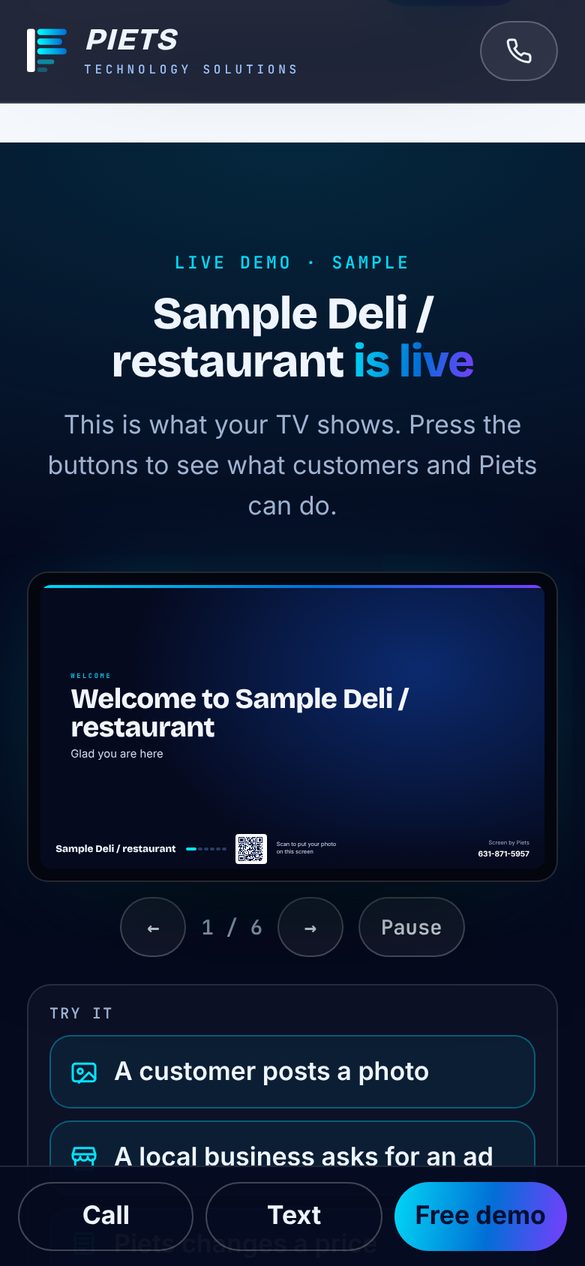
Open the Live Console → Piet BoxYour TV, Working for You.
One small box turns any TV into a menu board, an ad screen and a photo wall customers fill by QR.
Build Your Screen Demo → Website Demo BuilderSee Your New Website First.
Answer five questions, add your logo and photos, and watch a demo of your new site get built.
Build My Free Demo → Client PortalYour Job, in One Place.
Approve quotes, see visits and photos, pay invoices and message Piets from your phone.
Take the Portal Tour →One Company. A Site for Each Thing It Does.
Piets Technology Solutions is the hub — the people, the license, the trucks and the phone number. Each product gets its own home.
Piets Technology Solutions
The hub. Who we are, what we install, where we cover, and a human at any hour.
You Are Here Design StudioSee It on Your House
Cameras and lighting, placed on a photo of your own property before anyone quotes you.
Open It → The Piet BoxYour TV, Working for You
Menu boards, promos, a QR photo wall and ads local businesses pay for.
Build a Screen → Piets Site StudioWebsites, Built in Front of You
Five questions and a logo, and your new site appears.
Build a Demo → Field HQThe CRM for Field Service
Quotes, scheduling, invoices and a client portal — the system Piets runs its own jobs on.
Open the Console → Piets Fleet · in developmentTrucks, Fuel and Partners
The vehicle device and the partner network that sends fuel and service to the vehicle.
See the Concept →Pick Your Industry.
Restaurants
Our biggest segment. POS, kitchen printers, TV menu boards, cameras over the register and Wi-Fi that holds up during the rush.
- POS
- Menu boards
- Cameras
- Guest Wi-Fi
Offices & Retail
A clean network closet, Wi-Fi with no dead zones, VoIP phones, door access and cameras.
- Networking
- VoIP
- Access
- IT support
Property Managers
Video intercoms, fob access, common-area cameras and building Wi-Fi.
- Intercoms
- Fobs
- Cameras
Builders & GCs
Your low-voltage partner on new builds: structured cabling, pre-wire, network rough-in and finish.
- Cabling
- Pre-wire
- Rough-in
Dental & Medical
Secure, separated networks, door access for staff areas, phones and cameras.
- Networks
- Doors
- Phones
Auto Shops
Cameras over bays, lots and the counter, office Wi-Fi and phones that reach you in the shop.
- Bay cameras
- Wi-Fi
- Phones
Stores & Bodegas
Cameras over registers, doors and aisles, POS and card terminals, remote viewing from your phone.
- Registers
- POS
- Remote view
Homes
Whole-home Wi-Fi, cameras on your phone, and private smart home automation with no required cloud fees.
- Wi-Fi
- Cameras
- Smart Home
Bigger Building? Multiple Sites? One Low-Voltage Partner.
Cameras, access, cabling, Wi-Fi and phones planned together.
Patchwork of Vendors vs. One Piets System.
Patchwork of Vendors
- A different company for cameras, Wi-Fi and phones
- Nobody owns the problem when something breaks
- Separate bills, contacts and schedules
- Finger-pointing between vendors
One Piets System
- One partner for every low-voltage system
- You deal directly with the installer
- One contact, one plan, one schedule
- Clean, labeled installs with 24/7 support
Free Walkthrough or Video Demo
We look at your space and your goals — in person or on a video call.
Tailored Design & Quote
A plan built for your site: what goes where, and why. No one-size packages.
Clean, Labeled Install
Neat runs, labeled cables and a documented system you can find your way around.
Training & 24/7 Support
We show you how everything works. Questions later? Call or text any time.
Sell What Piets Builds, Under Your Own Name.
Other installers, IT shops and A/V companies resell the Piets software to their own clients. You keep the client and the relationship.
White-Labeled to You
Field HQ, the Piet Box, Site Studio and the Pietvue apps can all run under your logo, colors and domain. Your client never has to see the word Piets.
See What There Is to Resell →One Console for Your Accounts
Partner access runs under Field HQ — the same console the Piets team uses, scoped to your own clients.
Open the Console →You Are Not on Your Own
The person who built it picks up the phone. 631-871-5957, any hour, for you as well as for your client.
Call 631-871-5957 →Fleet Partners Too
Fuel delivery, mobile mechanics, parts counters and insurers join the Piets Fleet network, and the work the app raises routes to them.
Join the Network →Quoted to the Arrangement
Terms depend on what you resell and how many accounts you bring. There is no package price posted because there is not an honest one — ask and you get a number.
Ask for Terms →Your Client Stays Your Client
Piets does not go around a partner to the end customer. That is the whole arrangement, and it is in writing.
Talk It Through →Stay Ahead of Problems.
Plans are optional — no contract required to get service. Every plan is quoted to your site.
Basic
Custom Quote- Remote monitoring of network & cameras
- Monthly camera health check
- 24/7 phone & remote support
- Discounted on-site rates
Pro
Custom Quote- Everything in Basic
- Priority response, 24/7
- Quarterly on-site checkup
- Patching, backups & security updates
- Vendor coordination (ISP, POS, phones)
Business
Custom Quote- Everything in Pro
- 24/7 priority line
- Monthly on-site visit
- Camera, access control & phone management
- Custom SLA and reporting
Get the Smart Home Brochure.
Local, private automation for lights, locks, thermostats, shades and cameras — with no required cloud fees.
Based in Suffolk County. Serving New York.
On-site across Long Island, NYC, the Hudson Valley and the Johnstown / Capital Region. Remote support anywhere.
Long Island
Suffolk & Nassau County
See Long Island →New York City
All five boroughs
See New York City →Hudson Valley
Westchester, Putnam, Dutchess & Orange
See Hudson Valley →Johnstown & Capital Region
Johnstown, Gloversville, Amsterdam, Albany & Saratoga
See the Capital Region →Larger commercial projects anywhere in the US on request. Grown by word of mouth — ask us for references from jobs like yours.
Plan Your Project in 4 Quick Steps
Frequently Asked Questions
Do you really answer 24/7?
Yes — call or text 631-871-5957 any time. Questions? We're here 24/7.
Is the demo really free?
Yes. We can walk you through a camera system, Wi-Fi upgrade or POS setup in person or on a video call, with no obligation. References are available on request.
Which areas do you cover?
Suffolk and Nassau County on Long Island, all five NYC boroughs, the Hudson Valley (Westchester, Putnam, Dutchess, Orange) and the Johnstown / Capital Region. Remote support is available anywhere, and larger commercial projects anywhere in the US on request.
What camera brand do you install?
We are an InVid Tech Paramont authorized installer: IP cameras and recorders with 4K options, night vision and viewing from your phone — with no required monthly cloud fees.
Do I need a monthly plan?
No. Managed plans are optional — no contract is required to get service. They are there for people who want remote monitoring, camera health checks and priority support.
How much does it cost?
Every job is quoted to your site — there are no one-size packages. Book a free demo and you get a tailored plan and quote.
What payment methods do you accept?
Zelle, Venmo, Cash App, cash or check at no extra charge; credit/debit card via a secure payment link (4% card processing fee).
What is the Piet Box?
A small box that turns any TV into a menu board, ad screen and customer photo wall. Plug it in, scan the code on the screen, and Piets runs it for you. No router setup. Try the free demo on the Piet Box page.
How does remote support work?
We use a free remote support tool. You open it, read us your ID, and we connect with your permission.
Get a Tailored Plan — and a Free Demo.
Tell us about your project. You deal directly with the installer, start to finish.